December 20, 2025
What Running Apps Do I Need?
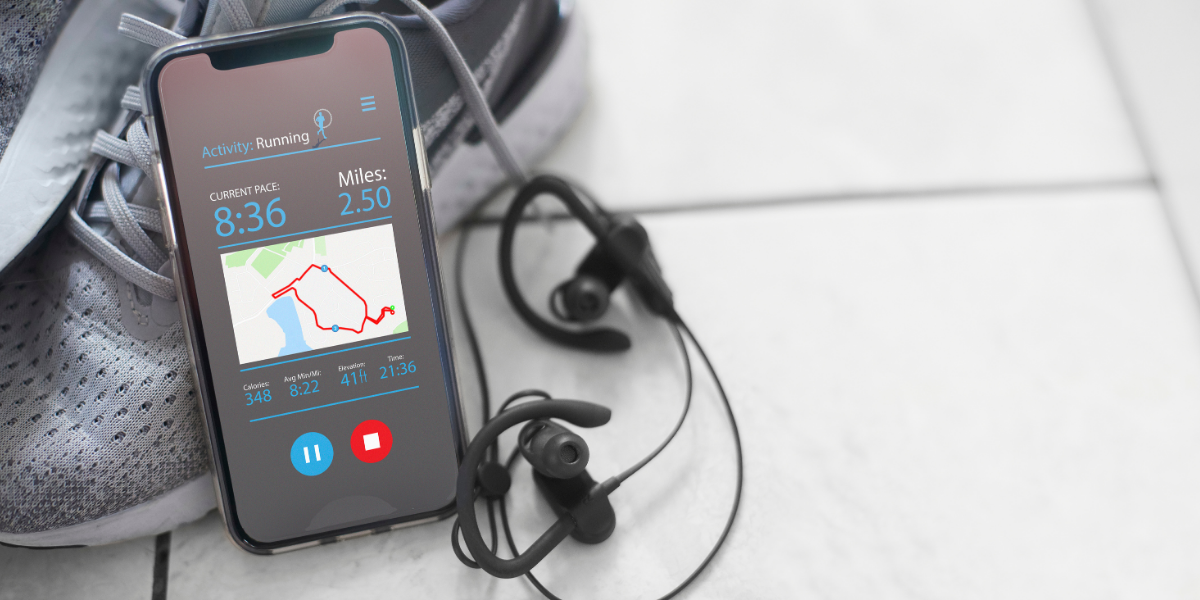
If you’ve ever gone looking for running apps, you’ve probably felt the same thing most runners feel: it’s not that there aren’t enough options—it’s that there are too many. You download a few, try to sync them, stare at dashboards full of charts, and somehow end up spending more time managing your running than actually running.
At Microcosm Coaching, we’re big believers in tools that support the process. But we’re equally committed to keeping things human. The right app setup should make running simpler, not louder. It should help you show up consistently, understand your training without obsessing, and stay excited about the long game.
This guide will help you build a simple “app stack” based on your goals. We’ll name the apps, explain what they’re best for, and show you how to choose a setup you’ll still use when work gets busy, travel happens, weather turns, and motivation dips.
The Quick Answer: Most Runners Need 2–4 Apps
You can do a lot with one app. But most runners thrive with a small stack that covers a few different jobs.
A clean setup usually looks like this:
- One app to track and store your runs (your home base log)
- One app to guide training (workouts, plans, structure)
- One app for routes and navigation (optional, but huge for trail and travel)
- One app for strength/mobility (optional, but powerful for durability)
That’s it. If you’re using five apps to do the same job, you’re not getting “more optimized.” You’re just creating friction.

Step 1: Pick One “Home Base” Tracking App
Your home base is where your running history lives. It’s the app you trust when you want to see consistency over months, track mileage, and notice patterns like, “I always feel flat when my sleep drops,” or “I run best when my easy runs stay truly easy.”
The goal isn’t to find the “most advanced” tracker. The goal is to find the tracker you’ll use on your most normal days.
Strava
Strava is one of the most popular hubs because it does two things well: it logs training clearly and it creates social connection. It’s especially useful if you run and cycle, because it keeps both sports in one place.
For many runners, Strava is the easiest way to stay accountable without needing a coach in your ear every day. You can follow friends, join challenges, and get that small push of motivation from seeing other people show up consistently.
One caution we share with athletes: if comparison messes with your confidence, Strava can feel like too much. The fix usually isn’t “delete it.” It’s boundaries. Adjust privacy settings, curate who you follow, and use the parts that support you.
Nike Run Club
Nike Run Club (NRC) is a great choice for runners who want simplicity and encouragement. It tracks your runs, stores your history, and includes guided audio runs that many athletes genuinely enjoy—especially on treadmill days, easy days, or when you want a mental reset.
NRC tends to feel more supportive and less data-heavy than some other platforms. If you’re newer to running, that matters. Too much information too early can create pressure, and pressure usually kills consistency.
If you like the idea of a voice helping you stay relaxed, keep an even effort, or just get through the run, NRC can be a strong home base.
Runkeeper
Runkeeper is a solid option for runners who want tracking without a big social layer. It’s straightforward, reliable for logging, and often feels calmer than apps designed around feeds and challenges.
This is the kind of app that works well if your goal is simply: record the run, see your weekly trend, and move on with your day.
MapMyRun
MapMyRun can work as a tracker, but many runners use it for one main reason: route planning. If you like designing routes in advance or you run in places where you need to plan loops, turnarounds, or long-run logistics, MapMyRun is useful.
Some athletes use it as their home base. Others treat it as a route tool and keep their main log elsewhere.
Your GPS watch ecosystem
If you run with a GPS watch, your watch platform can absolutely be your “source of truth.” Watches tend to be consistent, battery-friendly, and convenient.
The main decision is whether you want to keep everything inside your watch platform or use a hub like Strava on top of it. Either approach is fine. What we don’t recommend is trying to spread your training across multiple logs and then wondering why nothing feels clear.
Pick one place where your training “lives.” Let everything else be optional.
A Quick Reality Check: Why Apps Disagree On Pace And Distance
Runners get weirdly stressed about this, so let’s normalize it.
It’s common for two apps to give slightly different distances or paces for the same run. GPS signal quality, how frequently the device samples, auto-pause settings, and whether the app counts moving time or total time all affect the numbers.
Microcosm rule: choose one “source of truth” and stick with it. Your progress comes from patterns over weeks, not perfect accuracy on one random Tuesday.
Step 2: Decide Whether You Need A Training Structure Or Just Tracking
Tracking answers: “What did I do?”
Training structure answers: “What should I do next?”
If your goal is building a habit, you might not need a training plan right away. In fact, too much structure can sometimes backfire early on. Consistency comes first.
If your goal includes a race, a PR, a marathon, trail distance, or returning from a setback, structure usually helps. It reduces decision fatigue and creates progression you can trust.
Runna
Runna is popular because it gives you structured training plans with clear workouts. Many runners use it when they want a plan to follow without needing to design workouts themselves.
If you’re training for a 10K, half marathon, or marathon, Runna can provide day-to-day direction and a sense of momentum. For the right athlete, it’s a helpful bridge between “I’m winging it” and “I have a plan.”
Where app-based plans can get tricky is adaptation. Life stress, travel, illness, and fatigue don’t always fit neatly into a plan’s logic. Some apps adjust, but they still don’t understand you the way a coach does.
If you’re self-guided and you like structure, Runna can be a solid choice. If your life is unpredictable or you’re prone to doing too much when motivated, coaching support often becomes the safer, smarter option.
Couch to 5K
Couch to 5K apps are designed for one thing: helping brand-new runners build a running habit without getting hurt. They usually use a walk/run progression that’s intentionally manageable.
We like these apps because they make running feel possible. They keep the goal small enough to repeat. And repetition is what builds a runner.
If you’re starting from zero, don’t skip the boring part. The boring part is how your body adapts.
Nike Run Club (as a training tool)
Even if NRC is your tracker, it can also function like a training assistant because of its guided runs. For runners who don’t want a rigid plan but still want direction, guided runs can be a great middle ground.
The right structure is the one you’ll actually follow.
The Microcosm Lens: Structure Is Helpful, Adaptation Is The Real Advantage
Apps can be great at delivering workouts. What they can’t reliably do is interpret the messy reality of training.
At Microcosm, our athletes check in daily and we adjust training based on the full context: sleep, stress, soreness, mood, work travel, illness, motivation, menstrual cycle patterns, and what your body is actually telling you.
Training isn’t just workouts. It’s the relationship between stress and recovery over time.
If you want a plan that evolves with your life, a coach-supported system becomes less about “more support” and more about “better decisions.”
Step 3: Add Routes And Navigation If You Run Trails Or Explore
If you run mostly on familiar roads, you may not need a routes app. If you run trails, travel, or enjoy exploring, you probably do.
Route tools are not just about finding fun places to run. They reduce stress. They prevent wrong turns. They help you plan long runs when hydration, terrain, and timing matter.
AllTrails
AllTrails is widely used for trail discovery and navigation. It helps runners preview routes, understand elevation, and get a sense of what they’re stepping into.
For trail athletes, this matters. Trail runs are less predictable than roads. If you’ve ever ended up on an “easy” trail that turned into a steep scramble, you know why route intel matters.
If you run longer trail days, consider offline route access and battery planning. Navigation drains phones faster than many runners expect.
Trail Run Project
Trail Run Project is another trail-focused option used for route discovery and detailed trail information. If you’re trail-curious or you’re building your trail confidence, it can help you explore without guessing.
Safety: Build This Into Your Setup If You Run Solo
Safety isn’t paranoia. It’s preparation.
If you run early mornings, evenings, trails, or long runs solo, set up at least one method of live location sharing. Some apps offer live tracking features, and phones offer location sharing with trusted contacts.
This is one of those “set it once, forget it” steps that can make your training more sustainable—especially for long-run days.
Step 4: Motivation Apps (Optional, But Real If They Fit Your Brain)
Some runners don’t need motivation apps at all. Others benefit massively from them, especially when training gets repetitive or the weather is bleak.
The best motivation app is the one that aligns with how you’re wired.
Zombies, Run!
Zombies, Run! turns your run into an audio story experience. It’s immersive, playful, and can be a genuine game-changer if boredom is your biggest barrier.
This is especially helpful for treadmill runs, easy runs, or recovery runs where the goal is simply to show up and keep it light.
Charity Miles
Charity Miles connects your movement to a cause. If purpose motivates you more than pace, this is a simple and meaningful add-on.
We like tools that help athletes connect training to something bigger than numbers.
Step 5: Strength And Mobility Apps (The “Secret” To Staying Consistent)
We’ll keep this simple: most runners don’t get injured from one hard workout. They get injured from accumulating stress without enough durability work.
Strength and mobility don’t need to be complicated. They need to be repeatable.
If an app helps you do 10–20 minutes consistently, it’s doing its job.
Recover Athletics
Recover-style apps are popular because they prompt pre-run and post-run routines and offer runner-focused mobility and stability sessions. If you struggle to do mobility on your own, a prompt can be the difference between “never” and “twice a week.”
That difference matters over months.
Strength libraries (any follow-along strength app)
If you want follow-along sessions, pick a simple library that matches your equipment and time. For most runners, two short sessions per week is enough to create durability gains.
Microcosm coaching truth: consistency beats intensity. A modest strength routine you actually do is far more valuable than the “perfect” program you avoid.
Microcosm’s Recommended App Stacks By Goal
Let’s make this ultra practical. Here are simple setups that work.
Stack A: beginner or returning runner (2 apps)
Choose a tracker you enjoy (NRC, Runkeeper, Strava), and pair it with a beginner progression tool (Couch to 5K or guided runs in NRC).
Your job is not to train hard. Your job is to build a sustainable habit and confidence.
Stack B: marathon training (3 apps)
Use one home base tracker (Strava or your watch), add structured training support (Runna or a coaching hub), and include one strength/mobility tool.
Marathon training isn’t just long runs. It’s durability and recovery over time.
Stack C: trail runner (3–4 apps)
Use a tracker, add a trail navigation tool (AllTrails or Trail Run Project), set up location sharing for safety, and keep a simple mobility/strength routine.
Trail success is a mix of fitness, confidence, and preparation.
Stack D: hybrid runner/cyclist (2–3 apps)
Use one hub that handles multiple sports cleanly (Strava is often easiest), add a training structure tool, and include strength/mobility if you’re building volume.
The main goal here is clarity. One history. One plan. Less chaos.
Mistakes That Make Apps Less Helpful
If apps feel like a burden, it’s usually one of these patterns.
You downloaded too many apps at once and never learned which one you actually liked. You don’t need a full stack on day one. You need one tool you’ll use.
You started tracking every metric, and the numbers started driving your mood. Most runners don’t need more data. They need better interpretation.
You let social feeds influence confidence. Seeing someone else’s 12-mile “easy run” shouldn’t change your plan or your self-talk. Curate your environment.
You paid for subscriptions before you understood what you needed. Pay when something solves a real problem—route planning, safety, structured workouts, or training clarity.
You never set privacy settings. This is huge. Protect your start/end locations, especially if you run from home.
How To Choose Your Apps Without Overthinking
Ask yourself four questions.
- First: do I need tracking, or do I need structure?
- Second: do I run trails or new routes often enough to need navigation?
- Third: does social motivation help me, or distract me?
- Fourth: what’s the smallest setup I can stick to for the next 30 days?
Start with one home base tracker. Use it for a month. Then add one specialist tool only if it solves a real need.
That’s the human-first way to build a system that lasts.
Final word: Apps are tools — your process is the engine
The right apps don’t make you faster. They make it easier to show up. They remove friction, support consistency, and help you understand your training across time.
At Microcosm Coaching, we love simple systems. We also know that the biggest breakthroughs often come from the parts apps can’t fully capture: honest reflection, smart adjustments, sustainable stress management, and the long-term relationship you build with training.
If your goal is to keep running for years—not just crush one season—choose tools that support the human doing the running.
FAQs
What running apps do I need as a beginner?
Pick one tracker (NRC, Runkeeper, or Strava) and one beginner progression tool (Couch to 5K or guided runs in NRC). Keep it simple.
Is Strava enough by itself?
For logging and motivation, often yes. If you want structured training, add a plan tool or work with a coach.
Nike Run Club vs Strava—what’s the difference?
NRC is great for guided runs and a supportive feel. Strava is great as a long-term hub with community and multi-sport support.
What’s the best app for marathon training plans?
If you want an in-app plan, Runna is a common choice. If you want training that adapts to your real life, coaching support is often the better route.
Why do apps show different distances?
GPS tracking varies by device and settings. Pick one “source of truth” and focus on trends, not tiny differences.
What’s best for trail running routes?
AllTrails is a strong starting point for discovery and navigation. Trail Run Project is also a popular trail-focused option.
Are paid running apps worth it?
Sometimes. Pay when the features genuinely solve a problem for you—like routes, safety tools, or structured plans.
How many running apps is too many?
If you’re spending more time managing apps than running, it’s too many. Most runners thrive with 2–4.